
CONTENT IN A NUTSHELL:
You can create content in 2 ways:
- by posting in your Personal Blog, or
- by setting up a Group and posting in that group
Personal Blogs are a great way to publish and share your content without control on who can see it. Posting in Groups allows you create allow you to control who sees your posts. Unlike Personal Blog posts, when you post in your Group, its Members will be notified that you have posted something.
SOCIAL NETWORK IN A NUTSHELL
When you become a Member, you also become a part of the wider Nobodys Diary social network. If you create or join a group, you become a part of that network of Members. All networks have typical social media functions .
THE NITTY GRITTY
Some Members allow their content to be viewed by everyone. Where this is not the case, you will have to Register and Log In to view it or join their Group.
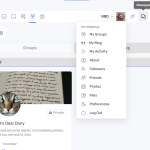
To Register – all you need is an email address and a password. You can do this on the ‘My Profile’ page or by selecting the Register link.
To Log In – first Register and then use the above details to Log In using the My Profile page. The first time you log in, please complete a few minor details on your profile page to be able to read or write anything. This is so other Members can recognise you. What you provide is totally private. We don’t exploit it – ever.
To Read – what Members have written, go to Categories in the main top navigation bar. There you will find all the content created by our members. All There are Each Page is the home page of something our Members have written. Select the Page title and you will see the content which has been written. It may be in the form of Chapters, it may be otherwise – it is the Member’s choice how they present their content.
To Write – go to My Profile and choose “My Blog” or “My Groups”. In “My Blog” choose “Create” and use the enhanced editor. In “My Groups” choose the ‘plus’ button in a blue circle to create a new Group. Post some content in the new Group using the basic editor enhancing it using Markdown as set out below. Thereafter, options will be clear.
To Create A Private Area which is closed to public view where you can write just Register, Log in and create a Group. Then set the privacy settings as you wish, e.g. open, private or secret etc. You can control who sees your Page and also have discussions within that group.
Creating a Social Network – If you like what a Member has written, you can Follow it, Like it, Save it, Share it and much more. If and when you do, if the content was posted in Group and you have joined it, you will be notified by email and in your notifications area when there are changes or when the Member Posts more content. You can control this.Take a look at your profile page for all the community features available to you.
About Markdown
Markdown is a lightweight markup language with plain text formatting syntax. It is designed so that it can be converted to HTML and many other formats (Learn more about it here.) You can copy the entirety of the text below and paste it as a post or a comment to see what it shows up as / renders as within PeepSo. Please note that tables need to be posted separately for them to work best. You can see the supported syntax below:
Headers:
# Header_text – for h1
## Header_text – for h2
### Header_text – for h3
#### Header_text – for h4
##### Header_text – for h5
###### Header_text – for h6
Basic text formatting:
**bold text** for bold text
*italic text* for italic text
~~strikethrough~~ for strikethrough
Sharing inline code:
`inline code` for inline code
Unordered and Ordered lists:
Unordered:
Subitems need 3 spaces and then a dash for it to work.
– Item 1
– Item 2
– Sub-item 1
– Sub-item 2
Ordered:
Subitems need 3 spaces and then a number for it to work.
1. Item 1
2. Item 2
1. Sub-item 1
2. Sub-item 2
Links and Images:
[link](https://PeepSo.com)` for link
 – for embedding images from other sources. These images will NOT be saved within your website. They are just linked to.
Tables:
Tables consist of cetain elements a simple dash “-” and a “|” (vertical bar, pipe, or or symbol)
| Header 1 | Header 2 | Header 3 |
|—|—|—|
| Row 1 | Data | Data |
| Row 2 | Data | Data |
Correct Formatting Rules for Tables:
Pipes (|) must separate columns.
The second row must contain dashes (—) to define the table.
Extra spaces are allowed but not required.
Aligning spaces only help readability and are optional.
Tasks / Checkboxes:
When used, you will see checked and unchecked checkboxes. They can only be clicked / checked or unchecked by editing the text. They can not be clicked.
– [x] Completed task
– [ ] Incomplete task
Get involved!
Comments